Clips
Clips, cut for you.
After the stream, Lumbus finds the moments worth posting and cuts them landscape or vertical, with subtitles. While you are live, keep any moment with one press.
AI clips
Found for you, after the stream.
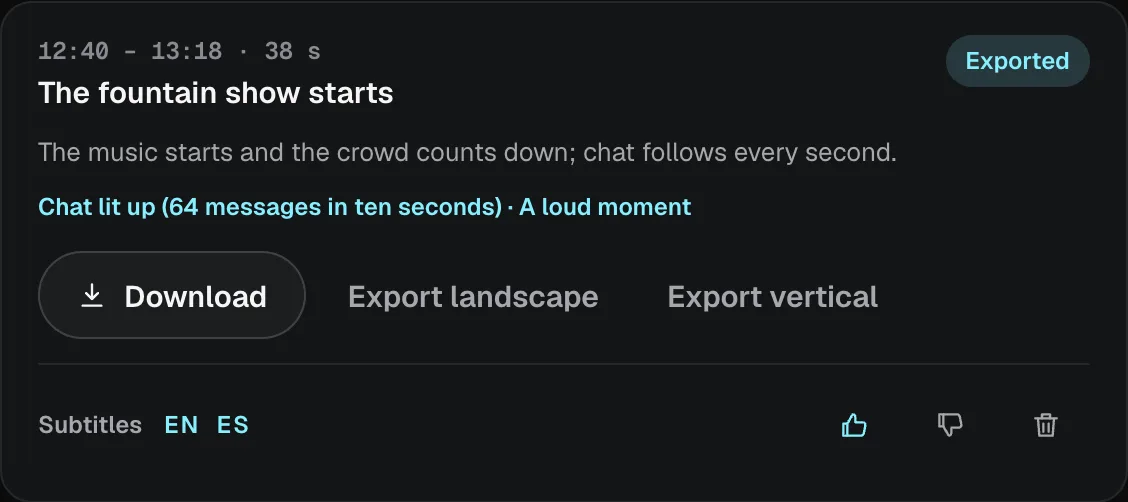
When a stream ends, Lumbus reads it, finds the moments worth posting and cuts each one landscape or vertical, with subtitles in your brand kit’s style. You keep the good ones and download them.
- Each clip says when it happens and why it was picked
- Export landscape or vertical, or download it as it is
- Thumbs up or down to say which ones were right
Your clips
Keep a moment while you are live.
Press Clip this moment when something happens, or Clip that to keep the last 30 seconds, 1 minute or 2 minutes of the recording. Each lands under Your clips, ready to export after the stream.
- Cut without re-encoding, while you stream
- On every plan, from the dashboard or the Lumbus Live app
- Every recorded stream downloads as MP4, straight into Premiere Pro, Final Cut Pro, DaVinci Resolve or CapCut.
By plan
AI clips on every plan.
More hours of your streams read and more clips exported as the plan grows. Need more hours? 10 more are $9.
- 2
- Free
- 10
- Studio
- 40
- Studio Plus
- 100
- Studio Pro
- 250
- Studio Max
- 1
- Free
- 3
- Studio
- 10
- Studio Plus
- 25
- Studio Pro
- 50
- Studio Max
And on the higher plans
Clips that get to know you.
AI clips that learn what you keepFrom Studio Pro
The clips it finds lean towards the ones you kept before.
Subtitles in up to five languagesFrom Studio Pro
The same clip with its subtitles in more than one language.
A searchable clips libraryFrom Studio Pro
Search your clips by what happens in them.
Highlights while you streamStudio Max
Moments flagged live, not only after the stream ends.
Approval before anything goes outStudio Max
A clip waits for a yes from your team before it is used.
Pick a plan and go live.
Buy by the month, or by the year to save 12%. Want to try it first? Studio Pro is free for three days, with eight hours on air and no card. Or start for free: two hours live a month, for as long as you like.